For the complete documentation index, see llms.txt. Markdown versions of all docs pages are available by appending .md to any docs URL.
Custom
Verified : Code examples on this page have been automatically tested and verified.Configure agentgateway for providers without built-in support that use an LLM API format.
Use this page for providers that use an LLM API format but do not have first-class provider: support. For built-in providers such as Baseten, Cerebras, Cohere, DeepInfra, DeepSeek, Fireworks AI, GitHub Copilot, Groq, Hugging Face, Meta, Mistral, OpenRouter, Perplexity, Together AI, TypeSafe, xAI, and Ollama, use the dedicated provider pages instead.
Note
Many providers provide “OpenAI compatible” or “Anthropic compatible” endpoints.
While these can be used with provider: openai/provider: anthropic and a customized baseUrl, prefer to use provider: custom.
Using a specific vendor’s provider may introduce semantics specific to that provider.
Before you begin
Install theagentgateway binary.You also need the following prerequisites.
- An API key for your chosen provider, unless you are pointing to a local endpoint such as vLLM or LM Studio.
Configuring a custom provider
With a custom provider, you provide the API endpoint and a list of formats it supports. Agentgateway will automatically handle mapping between the incoming format and the supported formats.
The formats list controls request conversion. The Responses conversion drops extended-thinking history without an error. To preserve it across turns, declare completions and omit responses.
Declare only the formats that the upstream server supports. For example, include responses only if the server supports /v1/responses. Include decisions only if the server supports /v1/decisions. For the conversion that each formats combination uses, see Provider format conversion.
Use systemOne for a TypeSafe SystemOne upstream that serves /v1/systemone. With systemOne, OpenAI Decisions requests from /v1/decisions go to /v1/systemone on the upstream. The conversion returns the upstream response in the Decisions format. The conversion also works in the other direction: SystemOne requests from /v1/systemone can go to a decisions upstream. When a provider declares both formats, agentgateway prefers systemOne for SystemOne requests and decisions for Decisions requests.
An error such as failed to parse Messages request names the route type that parsed the client request before provider conversion. Check that the request path maps to the expected route type and that the body matches that format.
Converted response usage follows the API format that the client called. Messages responses use Anthropic usage conventions. In that format, usage.input_tokens excludes prompt-cache tokens. Chat Completions and Responses replies use OpenAI usage conventions. In those formats, the main input count includes prompt-cache tokens. When a Gemini OpenAI-compatible response reports reasoning tokens separately from usage.completion_tokens, converted Messages and Responses replies include visible output and reasoning tokens in usage.output_tokens.
The formats list is optional. A model without it accepts only requests on paths that are forwarded to the provider without format conversion, such as /v1/ocr, /v1/images/generations, and /v1/responses/compact. A request in an LLM API format has no format to convert to and is rejected. Examples include chat completions, messages, and SystemOne requests.
The following example configures a provider that exposes a Chat Completions API at the standard path.
To add the model in the UI, follow these steps. The steps create the same model as the Config file tab.
Set your API key in the
PERPLEXITY_API_KEYenvironment variable. The UI checks that the variable exists when you save the model.export PERPLEXITY_API_KEY='<your-api-key>'Create a configuration file with an empty
llmsection, and start agentgateway in the same terminal. Without anllmsection, the UI does not show the LLM > Models page.cat > config.yaml <<'EOF' # yaml-language-server: $schema=https://agentgateway.dev/schema/config llm: models: [] EOF agentgateway -f config.yamlOpen LLM > Models, such as http://localhost:15000/ui/llm/models, and click Add model.
From the Provider dropdown, select Custom.
Keep the default
custom/*in the Incoming model match field.For the Provider API key, select Env var, and enter
PERPLEXITY_API_KEY.In the Custom provider section, enter
https://api.perplexity.aifor the Base URL.In the Route formats list, keep Chat completions (/chat/completions) selected. Select any other format that the upstream supports, and optionally enter a path override for it.
For the Outgoing model, select Explicit, and enter
llama-3.1-sonar-large-128k-online.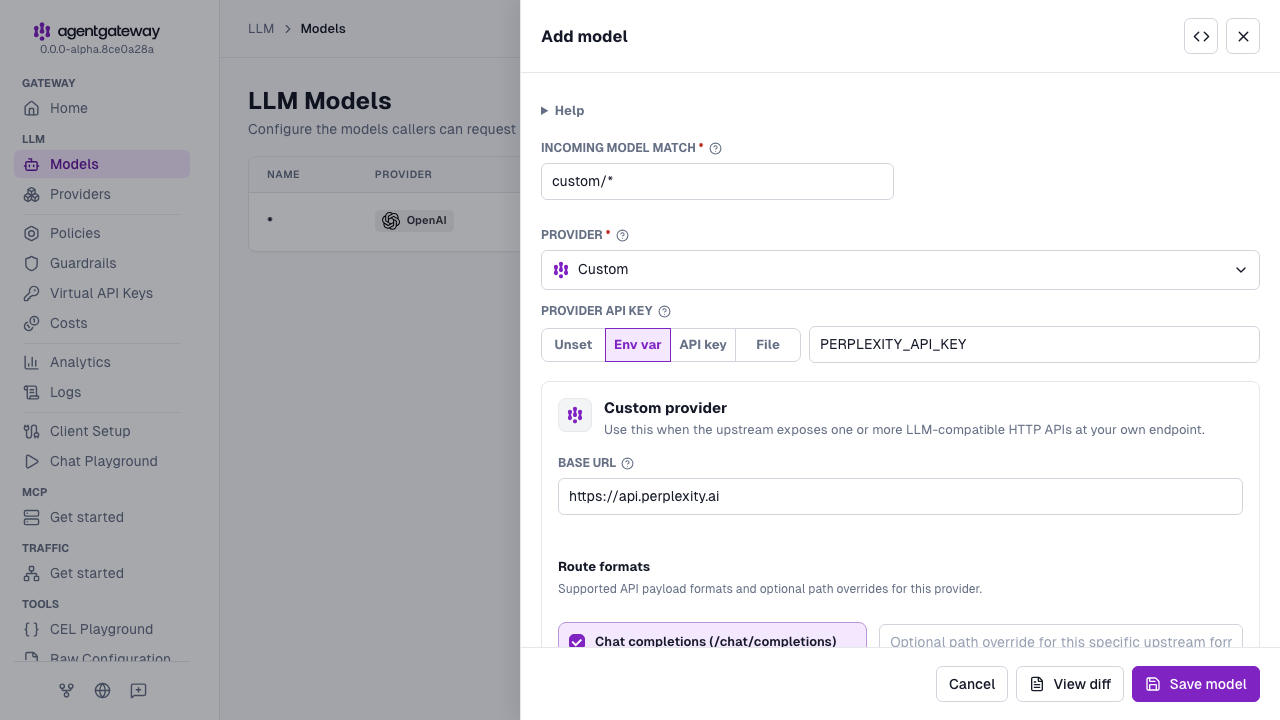
Click Save model.
Whether the UI can save depends on your storage mode. For more information, see Save changes from the UI.